
Standard ACL for Granular Network Access Control
Implementasi Standard Access Control List (ACL 1–99) untuk memfilter hak akses host PC0 (DITERIMA) dan memblokir host PC1 (DITOLAK) menuju Server0.
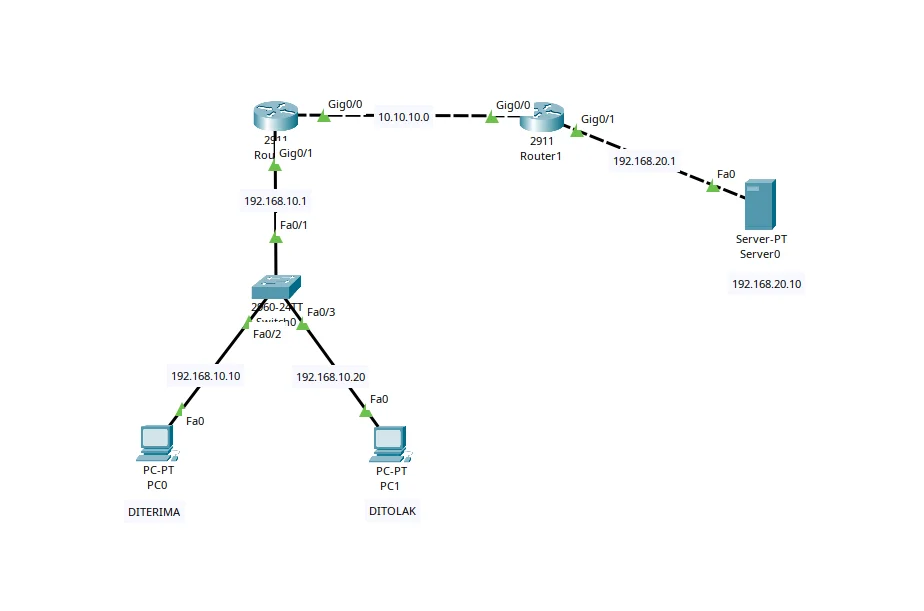
Panduan Konfigurasi & Lab Step-by-Step
Pendahuluan & Konsep Dasar Standard ACL
Access Control List (ACL) adalah kumpulan aturan (rule filtering) sekuensial yang diterapkan pada antarmuka router untuk mengontrol paket data yang masuk (inbound) maupun keluar (outbound).
Pada arsitektur jaringan Cisco IOS, Standard ACL beroperasi pada Layer 3 (Network Layer) dengan karakteristik utama:
1 – 99 atau rentang diperluas 1300 – 1999, serta mendukung Named Standard ACL (ip access-list standard <NAME>).deny any. Jika tidak ada permit, semua paket lainnya akan terbuang (dropped).---
Skenario & Tabel Pengalamatan IP (Addressing Table)
Dalam lab simulasi ini, kita ingin mengamankan akses ke Server0 (192.168.20.10) yang berada di belakang Router1:
| Perangkat | Antarmuka / Interface | IP Address | Subnet Mask | Default Gateway | Keterangan |
|---|---|---|---|---|---|
| Router0 | Gig0/1 | 192.168.10.1 | 255.255.255.0 (/24) | - | Gateway Segmen LAN Klien |
| Router0 | Gig0/0 | 10.10.10.1 | 255.255.255.252 (/30) | - | Inter-Router Link (ke Router1) |
| Router1 | Gig0/0 | 10.10.10.2 | 255.255.255.252 (/30) | - | Inter-Router Link (ke Router0) |
| Router1 | Gig0/1 | 192.168.20.1 | 255.255.255.0 (/24) | - | Gateway Segmen Server (Filter ACL) |
| PC0 | FastEthernet0 | 192.168.10.10 | 255.255.255.0 (/24) | 192.168.10.1 | Klien Diizinkan (*Permitted*) |
| PC1 | FastEthernet0 | 192.168.10.20 | 255.255.255.0 (/24) | 192.168.10.1 | Klien Diblokir (*Denied*) |
| Server0 | FastEthernet0 | 192.168.20.10 | 255.255.255.0 (/24) | 192.168.20.1 | Target Resource Terproteksi |
---
Langkah-Langkah Konfigurasi (Step-by-Step Configuration)
Langkah 1: Konfigurasi Interface & Routing Static pada Router0
Router> enableRouter# configure terminalRouter(config)# hostname Router0 // Konfigurasi link penghubung antar-routerRouter0(config)# interface GigabitEthernet0/0Router0(config-if)# ip address 10.10.10.1 255.255.255.252Router0(config-if)# no shutdownRouter0(config-if)# exit // Konfigurasi gateway LAN klien (PC0 & PC1)Router0(config)# interface GigabitEthernet0/1Router0(config-if)# ip address 192.168.10.1 255.255.255.0Router0(config-if)# no shutdownRouter0(config-if)# exit // Routing statik menuju network server di Router1Router0(config)# ip route 192.168.20.0 255.255.255.0 10.10.10.2Router0(config)# exitRouter0# write memoryLangkah 2: Konfigurasi Interface & Routing Static pada Router1
Router> enableRouter# configure terminalRouter(config)# hostname Router1 // Konfigurasi link penghubung antar-routerRouter1(config)# interface GigabitEthernet0/0Router1(config-if)# ip address 10.10.10.2 255.255.255.252Router1(config-if)# no shutdownRouter1(config-if)# exit // Konfigurasi gateway segmen ServerRouter1(config)# interface GigabitEthernet0/1Router1(config-if)# ip address 192.168.20.1 255.255.255.0Router1(config-if)# no shutdownRouter1(config-if)# exit // Routing statik balik menuju network klien di Router0Router1(config)# ip route 192.168.10.0 255.255.255.0 10.10.10.1Langkah 3: Membuat & Menerapkan Named Standard ACL pada Router1
Kita membuat ACL bernama FILTER-SERVER-ACCESS yang secara eksplisit menolak IP PC1 (192.168.10.20) dan mengizinkan traffic lainnya (permit any).
// Membuat Named Standard ACLRouter1(config)# ip access-list standard FILTER-SERVER-ACCESSRouter1(config-std-nacl)# deny host 192.168.10.20Router1(config-std-nacl)# permit anyRouter1(config-std-nacl)# exit // Menerapkan ACL pada interface Gig0/1 arah OUTBOUND (menuju Server0)Router1(config)# interface GigabitEthernet0/1Router1(config-if)# ip access-group FILTER-SERVER-ACCESS outRouter1(config-if)# exitRouter1(config)# exitRouter1# write memoryout pada GigabitEthernet0/1 karena paket yang datang dari Router0 (Gig0/0) menuju Server0 keluar melewati antarmuka Gig0/1.---
Pengujian & Verifikasi (Testing & Verification)
A. Verifikasi Status ACL & Counter Paket pada Router1
Jalankan perintah show access-lists untuk melihat kecocokan (matches) paket pada aturan:
Router1# show access-listsStandard IP access list FILTER-SERVER-ACCESS 10 deny 192.168.10.20 (4 matches) 20 permit any (8 matches)B. Pengujian Konektivitas dari PC0 (192.168.10.10)
Buka Terminal / Command Prompt pada PC0 lalu jalankan ping ke Server:
PC0> ping 192.168.20.10 Pinging 192.168.20.10 with 32 bytes of data:Reply from 192.168.20.10: bytes=32 time<1ms TTL=126Reply from 192.168.20.10: bytes=32 time<1ms TTL=126Reply from 192.168.20.10: bytes=32 time<1ms TTL=126Reply from 192.168.20.10: bytes=32 time<1ms TTL=126 Ping statistics for 192.168.20.10: Packets: Sent = 4, Received = 4, Lost = 0 (0% loss)(Hasil: SUCCESS / DITERIMA)
C. Pengujian Pemblokiran dari PC1 (192.168.10.20)
Buka Terminal / Command Prompt pada PC1 lalu jalankan ping ke Server:
PC1> ping 192.168.20.10 Pinging 192.168.20.10 with 32 bytes of data:Reply from 10.10.10.2: Destination host unreachable.Reply from 10.10.10.2: Destination host unreachable.Reply from 10.10.10.2: Destination host unreachable.Reply from 10.10.10.2: Destination host unreachable. Ping statistics for 192.168.20.10: Packets: Sent = 4, Received = 0, Lost = 4 (100% loss)(Hasil: DENIED / DITOLAK - Router1 merespons dengan Destination host unreachable).
---
Analisis & Kesimpulan Teknis
deny host 192.168.10.20) wajib ditempatkan sebelum aturan umum (permit any), karena evaluasi ACL berjalan dari atas ke bawah (top-to-bottom) dan berhenti pada kecocokan pertama.