
Enterprise VLAN & Inter-VLAN Router-on-a-Stick
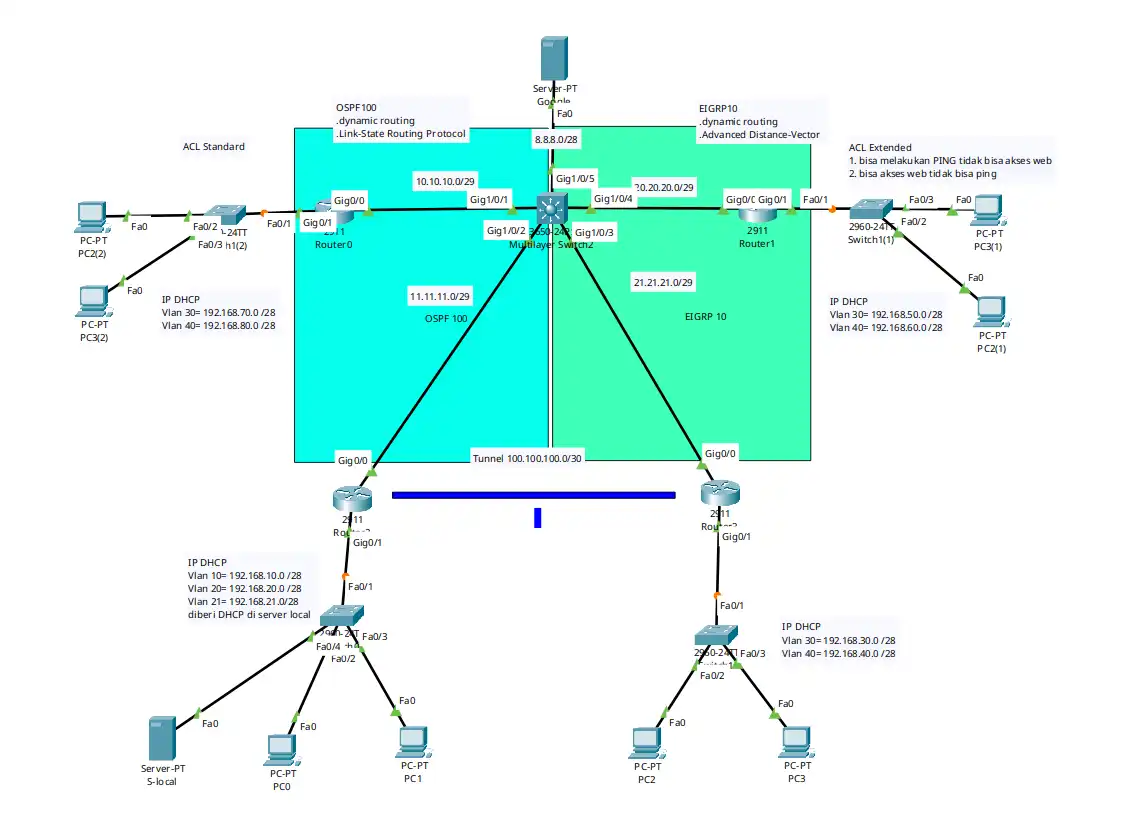
Infrastruktur enterprise terpadu memadukan Inter-VLAN Subinterfaces, DHCP Dynamic Pool, OSPF 100 & EIGRP 10 Redistribution pada Multilayer Switch, GRE Tunnel 100.100.100.0/30, serta Standard & Extended ACL.
Cisco Packet TracerInter-VLAN 802.1QDHCP Server /28OSPF 100EIGRP 10GRE TunnelExtended ACL
Panduan Konfigurasi & Lab Step-by-Step
1
Pendahuluan & Konsep Arsitektur Enterprise Hybrid
Topologi Enterprise Multi-Segment & Hybrid Routing ini menggabungkan beberapa teknologi fundamental dalam satu infrastruktur terintegrasi:
•VLAN & Router-on-a-Stick (802.1Q): Memisahkan traffic broadcast departemen ke dalam VLAN 10, 20, 21, 30, dan 40 dengan prefix efisien
/28 (14 host per subnet).•DHCP Service: Alokasi IP dinamis otomatis via DHCP Server lokal (
192.168.10.2) dengan ip helper-address serta DHCP Pool onboard pada Router.•Hybrid Dynamic Routing: Menghubungkan domain routing OSPF 100 dan EIGRP 10 melalui Mutual Route Redistribution pada Core Multilayer Switch 3560.
•Site-to-Site GRE Tunnel: Menghubungkan jaringan cabang privat melalui antarmuka virtual Tunnel (
100.100.100.0/30).•Extended ACL Security Policy: Mengontrol akses spesifik (membedakan izin traffic Web HTTP port 80 dan PING ICMP ke Server Pusat).
---
2
Skenario & Tabel Pengalamatan IP (Addressing Table)
| Perangkat | Interface / VLAN | IP Address | Subnet Mask | Default Gateway | Fungsi / Keterangan |
|---|---|---|---|---|---|
| Branch-Left | Gig0/0.10 | 192.168.10.1 | 255.255.255.240 (/28) | - | Gateway VLAN 10 (DHCP Server LAN) |
| Branch-Left | Gig0/0.20 | 192.168.20.1 | 255.255.255.240 (/28) | - | Gateway VLAN 20 (Staff LAN) |
| Branch-Left | Gig0/0.21 | 192.168.21.1 | 255.255.255.240 (/28) | - | Gateway VLAN 21 (Management LAN) |
| Branch-Left | Gig0/1 | 10.10.10.2 | 255.255.255.248 (/29) | - | Uplink ke Core MLS (OSPF 100) |
| Core-MLS 3560 | Gig1/0/1 | 10.10.10.1 | 255.255.255.248 (/29) | - | Link ke Branch-Left (OSPF 100) |
| Core-MLS 3560 | Gig1/0/2 | 11.11.11.1 | 255.255.255.248 (/29) | - | Link ke Transit Router (OSPF 100) |
| Core-MLS 3560 | Gig1/0/3 | 21.21.21.1 | 255.255.255.248 (/29) | - | Link ke Branch-Right Link 2 (EIGRP 10) |
| Core-MLS 3560 | Gig1/0/4 | 20.20.20.1 | 255.255.255.248 (/29) | - | Link ke Branch-Right Link 1 (EIGRP 10) |
| Core-MLS 3560 | Gig1/0/5 | 8.8.8.1 | 255.255.255.240 (/28) | - | Central Google/Web Server Gateway |
| Branch-Right | Gig0/0 | 20.20.20.2 | 255.255.255.248 (/29) | - | Uplink ke Core MLS (EIGRP 10) |
| Branch-Right | Gig0/1.30 | 192.168.30.1 | 255.255.255.240 (/28) | - | Gateway VLAN 30 (Block Web Only) |
| Branch-Right | Gig0/1.40 | 192.168.40.1 | 255.255.255.240 (/28) | - | Gateway VLAN 40 (Block Ping Only) |
| Central Server | FastEthernet0 | 8.8.8.8 | 255.255.255.240 (/28) | 8.8.8.1 | Central HTTP & DNS Server |
---
3
Langkah-Langkah Konfigurasi (Step-by-Step Configuration)
Langkah 1: Subinterfaces Router-on-a-Stick & DHCP Relay pada Branch-Router-Left
Router> enableRouter# configure terminalRouter(config)# hostname Branch-Router-Left // Subinterface VLAN 10Branch-Router-Left(config)# interface GigabitEthernet0/0.10Branch-Router-Left(config-subif)# encapsulation dot1Q 10Branch-Router-Left(config-subif)# ip address 192.168.10.1 255.255.255.240Branch-Router-Left(config-subif)# ip helper-address 192.168.10.2Branch-Router-Left(config-subif)# exit // Subinterface VLAN 20Branch-Router-Left(config)# interface GigabitEthernet0/0.20Branch-Router-Left(config-subif)# encapsulation dot1Q 20Branch-Router-Left(config-subif)# ip address 192.168.20.1 255.255.255.240Branch-Router-Left(config-subif)# ip helper-address 192.168.10.2Branch-Router-Left(config-subif)# exit // Subinterface VLAN 21Branch-Router-Left(config)# interface GigabitEthernet0/0.21Branch-Router-Left(config-subif)# encapsulation dot1Q 21Branch-Router-Left(config-subif)# ip address 192.168.21.1 255.255.255.240Branch-Router-Left(config-subif)# ip helper-address 192.168.10.2Branch-Router-Left(config-subif)# exit // Aktifkan Interface FisikBranch-Router-Left(config)# interface GigabitEthernet0/0Branch-Router-Left(config-if)# no shutdownBranch-Router-Left(config-if)# exit // Uplink & OSPF RoutingBranch-Router-Left(config)# interface GigabitEthernet0/1Branch-Router-Left(config-if)# ip address 10.10.10.2 255.255.255.248Branch-Router-Left(config-if)# no shutdownBranch-Router-Left(config-if)# exit Branch-Router-Left(config)# router ospf 100Branch-Router-Left(config-router)# router-id 2.2.2.2Branch-Router-Left(config-router)# network 10.10.10.0 0.0.0.7 area 0Branch-Router-Left(config-router)# network 192.168.10.0 0.0.0.15 area 0Branch-Router-Left(config-router)# network 192.168.20.0 0.0.0.15 area 0Branch-Router-Left(config-router)# network 192.168.21.0 0.0.0.15 area 0Branch-Router-Left(config-router)# exitLangkah 2: Konfigurasi Core Multilayer Switch 3560 (Redistribution OSPF & EIGRP)
Switch> enableSwitch# configure terminalSwitch(config)# hostname Core-MultilayerSwitchSwitch(config)# ip routing // Konfigurasi Port Routed (no switchport)Switch(config)# interface GigabitEthernet1/0/1Switch(config-if)# no switchportSwitch(config-if)# ip address 10.10.10.1 255.255.255.248Switch(config-if)# exit Switch(config)# interface GigabitEthernet1/0/4Switch(config-if)# no switchportSwitch(config-if)# ip address 20.20.20.1 255.255.255.248Switch(config-if)# exit Switch(config)# interface GigabitEthernet1/0/5Switch(config-if)# no switchportSwitch(config-if)# ip address 8.8.8.1 255.255.255.240Switch(config-if)# exit // OSPF 100 dengan Redistribusi EIGRPSwitch(config)# router ospf 100Switch(config-router)# router-id 1.1.1.1Switch(config-router)# network 10.10.10.0 0.0.0.7 area 0Switch(config-router)# network 8.8.8.0 0.0.0.15 area 0Switch(config-router)# redistribute eigrp 10 subnetsSwitch(config-router)# exit // EIGRP 10 dengan Redistribusi OSPFSwitch(config)# router eigrp 10Switch(config-router)# network 20.20.20.0 0.0.0.7Switch(config-router)# redistribute ospf 100 metric 10000 100 255 1 1500Switch(config-router)# exitLangkah 3: Konfigurasi Branch-Router-Right (DHCP Onboard & Extended ACL)
Router> enableRouter# configure terminalRouter(config)# hostname Branch-Router-Right // DHCP Pool OnboardBranch-Router-Right(config)# ip dhcp pool VLAN30_RIGHTBranch-Router-Right(dhcp-config)# network 192.168.30.0 255.255.255.240Branch-Router-Right(dhcp-config)# default-router 192.168.30.1Branch-Router-Right(dhcp-config)# exit Branch-Router-Right(config)# ip dhcp pool VLAN40_RIGHTBranch-Router-Right(dhcp-config)# network 192.168.40.0 255.255.255.240Branch-Router-Right(dhcp-config)# default-router 192.168.40.1Branch-Router-Right(dhcp-config)# exit // Extended ACL PoliciesBranch-Router-Right(config)# ip access-list extended BLOCK-WEB-ONLYBranch-Router-Right(config-ext-nacl)# permit icmp any host 8.8.8.8Branch-Router-Right(config-ext-nacl)# deny tcp any host 8.8.8.8 eq 80Branch-Router-Right(config-ext-nacl)# permit ip any anyBranch-Router-Right(config-ext-nacl)# exit Branch-Router-Right(config)# ip access-list extended BLOCK-PING-ONLYBranch-Router-Right(config-ext-nacl)# permit tcp any host 8.8.8.8 eq 80Branch-Router-Right(config-ext-nacl)# deny icmp any host 8.8.8.8Branch-Router-Right(config-ext-nacl)# permit ip any anyBranch-Router-Right(config-ext-nacl)# exit // Penerapan ke SubinterfaceBranch-Router-Right(config)# interface GigabitEthernet0/1.30Branch-Router-Right(config-subif)# encapsulation dot1Q 30Branch-Router-Right(config-subif)# ip address 192.168.30.1 255.255.255.240Branch-Router-Right(config-subif)# ip access-group BLOCK-WEB-ONLY inBranch-Router-Right(config-subif)# exit Branch-Router-Right(config)# interface GigabitEthernet0/1.40Branch-Router-Right(config-subif)# encapsulation dot1Q 40Branch-Router-Right(config-subif)# ip address 192.168.40.1 255.255.255.240Branch-Router-Right(config-subif)# ip access-group BLOCK-PING-ONLY inBranch-Router-Right(config-subif)# exit---
4
Pengujian & Verifikasi (Testing & Verification)
A. Verifikasi Tabel Routing OSPF & EIGRP pada Core-MLS
Core-MultilayerSwitch# show ip routeGateway of last resort is not set 8.0.0.0/28 is subnetted, 1 subnetsC 8.8.8.0 is directly connected, GigabitEthernet1/0/5 10.0.0.0/29 is subnetted, 1 subnetsC 10.10.10.0 is directly connected, GigabitEthernet1/0/1 20.0.0.0/29 is subnetted, 1 subnetsC 20.20.20.0 is directly connected, GigabitEthernet1/0/4O 192.168.10.0/28 [110/2] via 10.10.10.2, GigabitEthernet1/0/1O 192.168.20.0/28 [110/2] via 10.10.10.2, GigabitEthernet1/0/1D EX 192.168.30.0/28 [170/2560512] via 20.20.20.2, GigabitEthernet1/0/4D EX 192.168.40.0/28 [170/2560512] via 20.20.20.2, GigabitEthernet1/0/4(Rute dari OSPF masuk sebagai `O` dan rute dari EIGRP masuk sebagai `D EX` External).
B. Pengujian Policy ACL pada VLAN 30 & VLAN 40
1.Host di VLAN 30 (`BLOCK-WEB-ONLY`):
•PING ke
8.8.8.8 -> SUCCESS (Reply received)•Akses Web Browser HTTP
http://8.8.8.8 -> BLOCKED (Request Timeout)2.Host di VLAN 40 (`BLOCK-PING-ONLY`):
•PING ke
8.8.8.8 -> BLOCKED (Destination host unreachable)•Akses Web Browser HTTP
http://8.8.8.8 -> SUCCESS (Webpage Loaded)---
5
Analisis Teknis & Kesimpulan
1.Efisiensi Prefix /28: Penggunaan subnet mask
255.255.255.240 menghemat 87.5% alamat IP dibanding menggunakan /24 konvensional di setiap segmen departemen.2.Mutual Route Redistribution: Penggunaan seed metric yang presisi pada EIGRP (
bandwidth delay reliability load mtu) mencegah inkonsistensi routing table antar protokol.